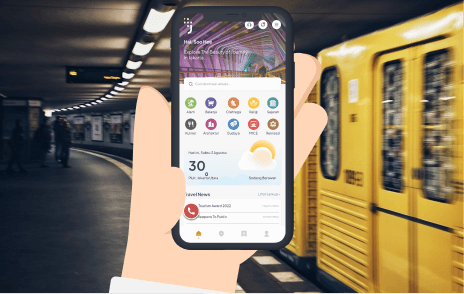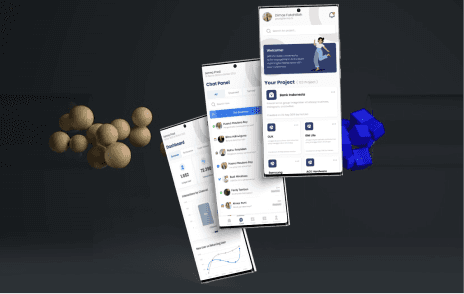
Koperasi Telkom Mobile Apps
1. Empathize (Empathy)
In this phase, the goal is to understand the users of the Koperasi Telkom app—who they are, what they need, what problems they face, and what their goals are.
User Research
Target Users:
Telkom Employees: Employees of Telkom Group who are members of Koperasi Telkom and use the app to manage savings, loans, and other cooperative-related activities.
Members of the Cooperative: Telkom employees who may also be involved in other activities like group savings, investments, or member benefits.
Research Methods:
Surveys & Questionnaires: Conduct surveys to gather insights on the specific features members use, challenges they face, and the value they expect from the app.
User Interviews: Interview a sample of Telkom employees to understand their pain points when using the app. This will provide direct feedback on what works well and what doesn’t.
App Analytics: Review app analytics to identify where users face issues, such as drop-off points, frequency of use of certain features, and overall engagement with the app.
User Personas
Based on research findings, we create detailed personas to represent different user segments of the Koperasi Telkom app.
Persona 1: Rina, 34 years old
Profile: A Telkom employee, using the app for managing savings and loans, frequently checks her loan balance and makes regular contributions to her savings.
Goals: Seamlessly track her savings and loan balances, easily apply for loans, and manage her contributions.
Frustrations: Complex and cluttered interface, difficulty finding specific features like loan applications or withdrawal options.
Persona 2: Agus, 45 years old
Profile: A senior Telkom employee, uses the app to review cooperative benefits, track member contributions, and check investment status.
Goals: Easily review investment performance and cooperative benefits, have fast access to statements and financial updates.
Frustrations: Slow app performance, inconsistent data updates, and lack of clarity in the user interface.
Key Insights from Research:
Pain Points:
Cluttered, non-intuitive interface makes navigation challenging.
Slow app performance, especially when loading balances or transaction histories.
Lack of real-time updates on cooperative-related activities (e.g., loan status, member contributions).
Complex loan application process, requiring multiple steps and verification.
User Needs:
A clean, organized, and easy-to-navigate interface.
Fast and responsive performance for accessing balance and transaction data.
Real-time data updates for savings, loans, and cooperative benefits.
Simplified loan application process with easy tracking of application status.
2. Define (Problem Definition)
In this phase, we narrow down the problems based on the insights gathered from the Empathize phase. This helps to focus on the most pressing issues that need to be solved.
Problem Statement:
For: Telkom employees who are members of Koperasi Telkom.
Who: Struggle with a cluttered user interface, slow performance, and a complex loan application process.
The Problem: They find it difficult to navigate the app to track savings, loans, and contributions efficiently. The loan application process is lengthy and the app performance is slow, impacting user experience.
The Goal: To redesign the app to be more intuitive, with faster performance, clearer navigation, and a simplified loan application process.
User Stories:
Rina’s Story: “As a Telkom employee, I want to quickly check my savings and loan balances without wasting time navigating through complex screens.”
Agus’s Story: “As a senior employee, I want to easily access my investment status and cooperative benefits without waiting for long loading times.”
3. Ideate (Idea Generation)
In this phase, we brainstorm potential solutions to address the defined problems.
Brainstorming Solutions:
Simplified User Interface (UI):
Redesign the home screen to prioritize key actions such as checking loan balances, reviewing savings, and accessing cooperative benefits with one-click access.
Categorize features logically (e.g., Savings, Loans, Investments, Benefits, etc.) to reduce visual clutter and improve discoverability.
Faster Performance:
Optimize app performance by reducing loading times, caching data locally where possible, and improving the responsiveness of financial data updates.
Streamlined Loan Application Process:
Create a step-by-step guided process that helps users submit loan applications easily. Add progress bars or status indicators to show how far along the user is in the application process.
Allow users to save draft loan applications and submit them later.
Real-Time Data and Updates:
Introduce push notifications to alert users about updates to their loan status, contribution deadlines, and any changes to cooperative benefits.
Integrate with backend systems for real-time financial data and transaction updates.
Educational Features:
Provide easy-to-understand explanations or tutorials about how the cooperative works and how users can take full advantage of their membership benefits.
Personalized Dashboard:
Introduce a personalized dashboard that displays important information such as account balance, loan status, upcoming deadlines, and recent transactions at a glance.
4. Prototype (Prototyping)
In this phase, we create low- and high-fidelity prototypes to visualize and test the solutions.
Wireframes and Mockups:
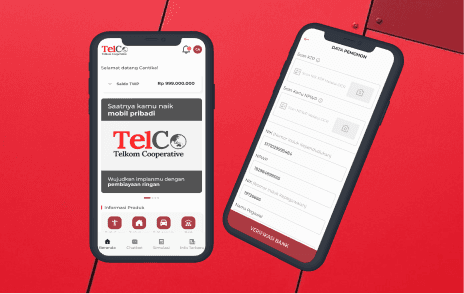
Home Screen: Design a clean and simple home screen with large, easy-to-read buttons for savings, loans, investments, and benefits.
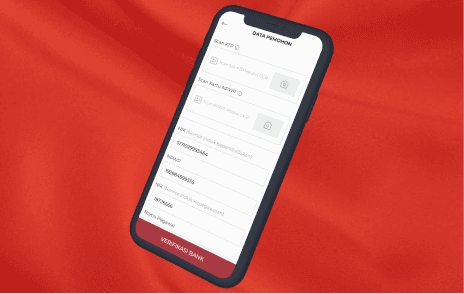
Loan Application Screen: Create an intuitive step-by-step loan application flow, with visual cues (e.g., progress bar) and the ability to save drafts.
Real-Time Notifications: Design a notification system that alerts users about loan approvals, upcoming deadlines, or other important cooperative news.
Personalized Dashboard: Develop a dashboard where users can easily see their most important data (e.g., account balances, loan status, next payment due) in one place.
High-Fidelity Prototype:
Using tools like Figma or Adobe XD, create an interactive prototype that simulates the core features such as:
Navigating through different sections of the app.
Submitting a loan application and tracking its status.
Receiving push notifications about important events or updates.
5. Test (Testing)
In this phase, we test the prototype with real users to gather feedback and make necessary improvements.
User Testing:
Participants: Rina (local employee) and Agus (senior employee).
Test Scenarios:
Scenario 1: Test the new user interface for ease of navigation. Does Rina find it easy to track her savings and loan balances?
Scenario 2: Test the loan application process. Can Agus submit a loan application without feeling overwhelmed by the steps?
Scenario 3: Evaluate the speed and responsiveness of the app. How fast does the app load savings/loan data and updates?
Usability Testing:
Metrics: Measure task completion rates (e.g., time taken to navigate to loan information, time to complete a loan application), user satisfaction ratings, and feedback on ease of use.
Feedback Collection: Collect user feedback on the new design, focusing on interface clarity, speed of app performance, and overall satisfaction.
Iteration and Refinement:
Based on user feedback, make necessary adjustments, such as simplifying the loan application process even further or optimizing the dashboard layout.
Conclusion
By applying the Design Thinking methodology, we’ve identified and addressed the key pain points in the Koperasi Telkom app:
Simplified user interface for easier navigation.
Improved performance with faster loading times and real-time data updates.
Streamlined loan application process to reduce complexity and enhance user experience.
Personalized dashboard to display the most relevant information at a glance.
These changes are aimed at making the app more user-friendly, reducing friction for users, and ensuring that Telkom employees can easily manage their savings, loans, and cooperative benefits through a responsive and intuitive mobile experience.