UI/UX Design Thinking: Omni Mobile Lenna App
1. Empathize (Empathy)
The first phase is to understand who the users of the Omni Mobile Lenna App are, what their needs are, and what challenges they face while using the app.
User Research
Target Users:
Retailers and Merchants: Business owners using the app to manage transactions, monitor sales data, and track finances.
Consumers: Individuals who may use the app for making payments, accessing loyalty rewards, or checking product information.
Research Methods:
Surveys and Interviews: Conduct surveys and user interviews to gather feedback from merchants and consumers about their experiences and expectations when using the app.
App Analytics: Use analytics tools to study user behavior, drop-off points, and feature usage, which helps identify areas of the app that need improvement (e.g., which features are rarely used or which pages have high bounce rates).
User Personas
Based on research findings, we can create personas that represent key user types to ensure the design process addresses their needs.
Persona 1: Arya, 28 years old
Profile: A merchant who uses the app for managing sales, payments, and financial tracking.
Goals: Efficiently process payments, review sales data, track transactions, and integrate with accounting systems.
Frustrations: Complexity in navigating through multiple screens for financial data, slow loading times, difficulty tracking payment statuses, and lack of customization options for dashboards.
Persona 2: Lina, 35 years old
Profile: A regular consumer who uses the app to make purchases, view product information, and redeem rewards.
Goals: Easily browse products, make quick and secure payments, and manage loyalty points.
Frustrations: Cluttered UI, difficult to find product categories, slow payment processing, and lack of transparency regarding loyalty rewards and redemption.
Key Insights from Research:
Pain Points:
Merchants: Navigation is cumbersome for reviewing sales reports and processing payments.
Consumers: Product browsing experience is not intuitive, and payment processes are slow or unclear.
Both users face issues with app performance, such as slow loading times or inconsistent real-time updates.
User Needs:
A streamlined dashboard for both merchants and consumers that displays relevant data (sales, payment status, product categories) at a glance.
Faster performance for payment processing and report generation.
Intuitive navigation for quick access to features such as loyalty points, product categories, and transaction histories.
Real-time updates for transactions, sales data, and product availability.
2. Define (Problem Definition)
Now, we focus on defining the core problems users are facing based on the insights gathered.
Problem Statement:
For: Merchants and consumers using the Omni Mobile Lenna App.
Who: Struggle with slow app performance, complicated navigation, and cluttered user interfaces.
The Problem: Merchants find it hard to access and analyze financial data, and consumers have difficulty browsing products and completing transactions quickly and efficiently.
The Goal: To redesign the Omni Mobile Lenna app with a focus on a simplified, faster, and more intuitive experience for both merchants and consumers.
User Stories:
Arya’s Story: “As a merchant, I want to quickly access and analyze my sales data and process payments without switching between multiple screens.”
Lina’s Story: “As a consumer, I want to find products easily, make fast and secure payments, and check my rewards balance without hassle.”
3. Ideate (Idea Generation)
During the Ideation phase, we generate ideas to solve the identified problems and meet user needs. Here are potential solutions for the Omni Mobile Lenna App:
Brainstorming Solutions:
Simplified Dashboard for Merchants:
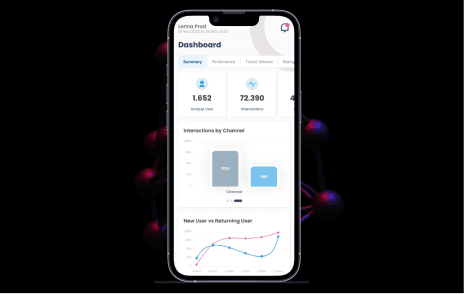
Create a single-view dashboard where merchants can quickly see key metrics like daily sales, payment statuses, transaction histories, and financial reports.
Use visual representations like graphs or charts to simplify understanding of sales trends and financial health.
Streamlined Shopping Experience for Consumers:
Introduce product categories that are easy to navigate with clear labels and filters (e.g., price range, new arrivals, discounts).
Use smart search functionality to help consumers quickly find products by name, category, or brand.
Improved Payment Process:
Implement one-click payments and secure payment gateways to streamline transactions.
Provide real-time transaction updates so that users can track the status of their payments or purchases instantly.
Intuitive Navigation:
Reduce the number of steps required to access features (e.g., payments, product categories, loyalty rewards).
Use bottom navigation with clearly defined icons for home, payments, products, rewards, and account settings.
Real-Time Notifications:
Push notifications for both merchants and consumers to inform them about transaction statuses, new sales, or reward points.
Loyalty Rewards and Discounts:
Introduce a rewards dashboard where consumers can track points, view available discounts, and easily redeem them during checkout.
Provide personalized offers based on purchase history or app activity.
4. Prototype (Prototyping)
In this phase, we create visual representations of the solutions that we have ideated to see how they would work in real life.
Wireframes and Mockups:
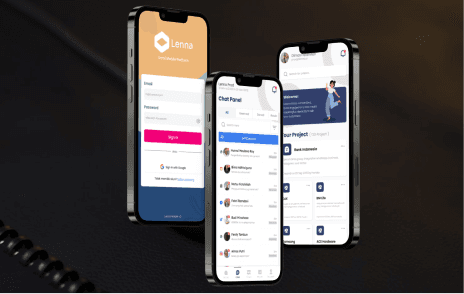
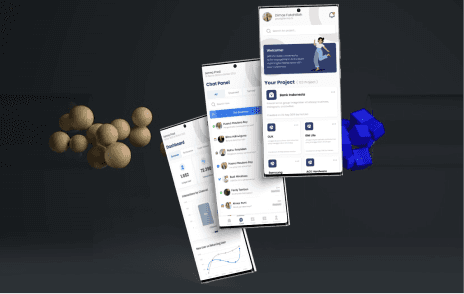
Merchant Dashboard: Create a wireframe showing a simplified merchant dashboard with key financial metrics, sales data, and an easy-to-access payment processing button.
Consumer Shopping Experience: Design a wireframe for product browsing, including category filters, product thumbnails, and a seamless checkout experience with a “one-click” payment option.
Real-Time Notifications: Design a mockup showing push notifications for successful transactions, rewards updates, and sale reminders.
Rewards Page: Develop a screen showing the user’s reward points, available discounts, and an option to redeem them immediately.
High-Fidelity Prototype:
Using tools like Figma, create an interactive prototype that simulates the following:
A fully functional merchant dashboard where the user can access sales data and process payments.
A consumer-facing product browsing flow, complete with search, filtering, and easy checkout.
Real-time notifications for transactions and rewards.
5. Test (Testing)
In the Testing phase, we evaluate the prototypes to gather insights and make necessary improvements.
User Testing:
Participants: Arya (merchant) and Lina (consumer).
Test Scenarios:
Merchant Scenario: Test the redesigned merchant dashboard for ease of use—does Arya find it easy to access key financial metrics and process payments?
Consumer Scenario: Test Lina’s experience when browsing products—how easily can she navigate categories, make a payment, and redeem rewards?
Both Scenarios: Test the performance of the payment process—how fast and secure is the checkout experience for both users?
Usability Testing:
Metrics: Measure task completion time, user satisfaction (via surveys or ratings), and ease of navigation (e.g., time spent finding products or processing payments).
Feedback Collection: Gather qualitative feedback on what users like, what they find confusing, and what features they would like to see improved.
Iteration and Refinement:
Based on the test results, refine the features. For example, if users find it hard to access financial reports on the dashboard, add a more prominent section or improve categorization.
If consumers are struggling with checkout speed, optimize the payment flow or investigate backend issues affecting performance.
Conclusion
By applying the Design Thinking process to the Omni Mobile Lenna App, we have identified key areas of improvement and proposed detailed solutions that address the needs of both merchants and consumers:
A simplified merchant dashboard for quick sales tracking and payment processing.
A streamlined product browsing experience for consumers with easy navigation and fast checkout.
A real-time notification system to keep both users updated on transactions and rewards.
An overall improvement in app performance, ensuring faster load times and smoother experiences.
These changes aim to significantly enhance the user experience, making the Omni Mobile Lenna App more intuitive, faster, and user-friendly, ultimately driving higher engagement and satisfaction among its users.